Magento
Build multi-channel commerce experiences for B2B and B2C customers on a single platform. From catalog to payment to fulfillment, our future-proof technology gives you a commerce platform that’s endlessly flexible, extensible and scalable. Whether you’re a B2B ready to go direct to consumer (D2C) or a B2C managing several brands in 10 different languages, Adobe Commerce lets you manage multiple sales channels and brands and expand into new countries, simply, from one platform. Adobe Commerce is completely scalable and extensible, with a modular core and headless capabilities that allow you to quickly incorporate new technologies.
Download plugin here.
Setup Your Plugin :
- Unzip & Copy the files to a directory under your Magento application.
- Access the command prompt as an administrator
- Go to your Magento-2 installation directory and run the following command: php bin/magento setup:upgrade && php bin/magento cache:flush
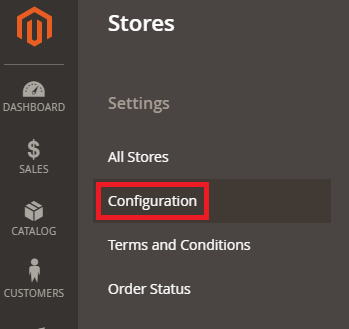
- In your Magento settings, go to Stores > Configuration
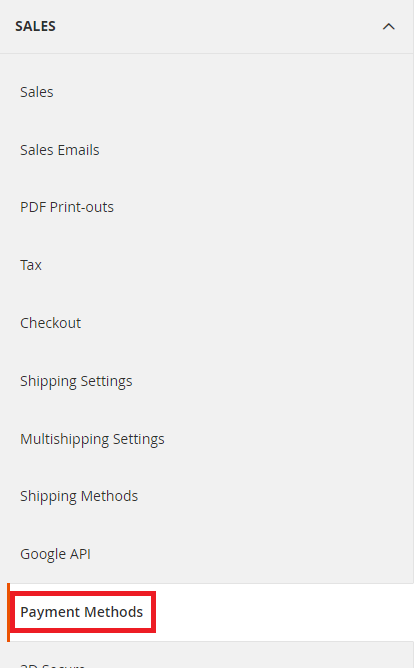
- Select Sales > Payment Methods from the sidebar.
- Configure below Settings and Save.
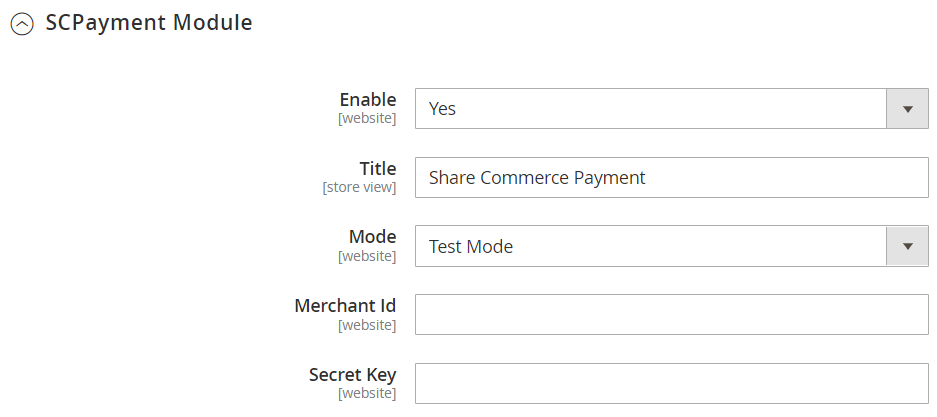
6.1. Enable Payment Gateway.
6.2. Merchant ID : Get your Merchant ID from Share Commerce (Different between UAT and Production).
6.3. Secret Key : Get your Secret Key from Share Commerce (Different between UAT and Production).
6.4. Mode : Select your environment whether you are in Development or ready for live.